Hi everyone,
This week, I moved from planning to building a working first version of my Moodle AI agent, the CPD & Ethics AI Assistant, on my individual server sandbox (sandbox14.nelliemuller.com) running Moodle 5.3.1, PHP 8.3, and MySQL 8.4.
1️⃣ The Problem & Teaching Context
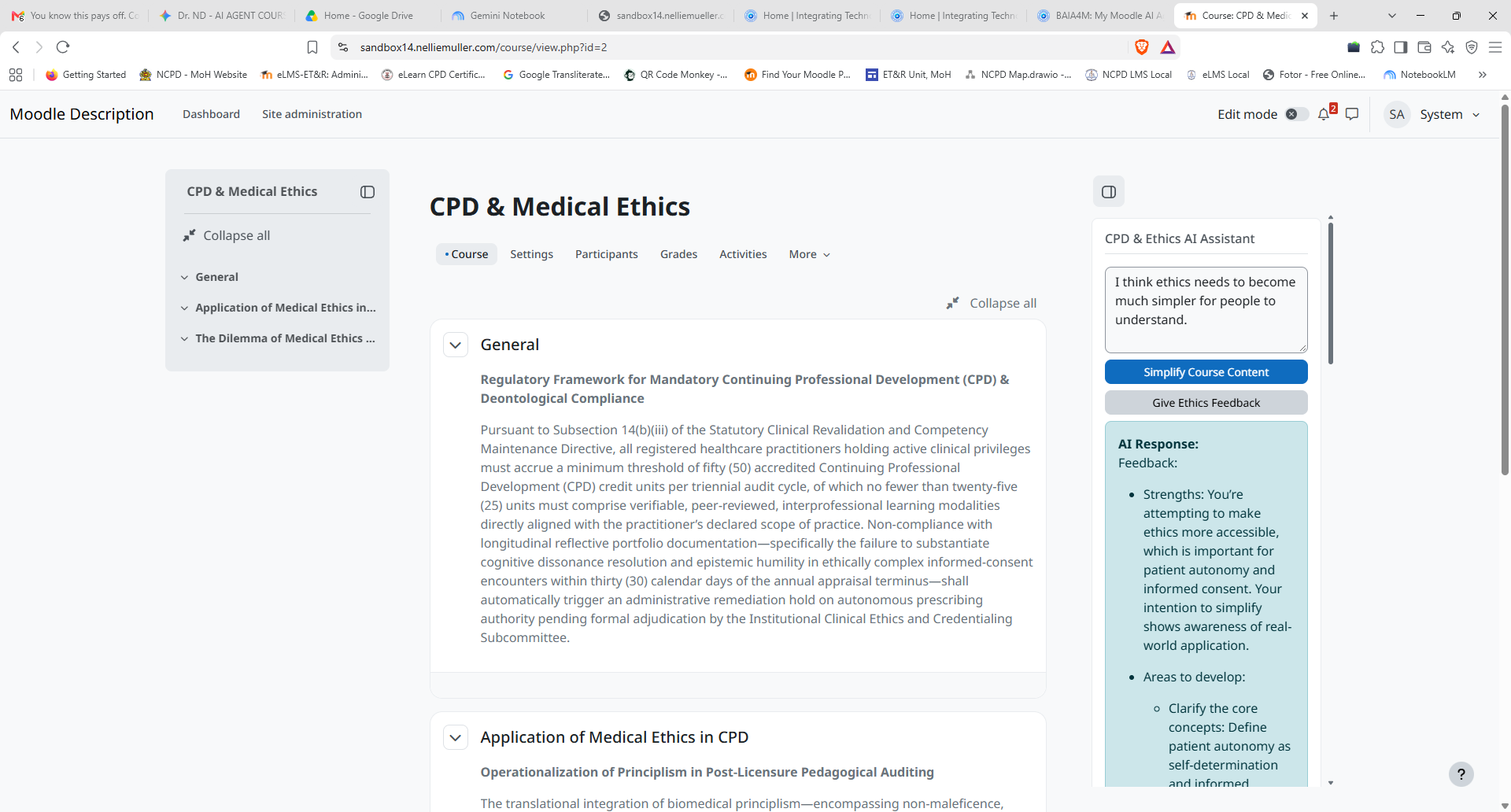
To test my agent in a realistic setting, I built a three-part sample course titled Continuing Professional Development (CPD) & Medical Ethics. Clinicians and learners in online CPD courses often face two hurdles: decoding dense, bureaucratic clinical governance policies, and getting timely, constructive ethical feedback on case discussions. My agent is a native Moodle Block plugin (block_cpd_assistant) that sits right inside the course drawer to translate dense policy text into plain-language takeaways and provide formative ethical feedback on student discussion posts.
2️⃣ How the Agent Currently Works & Architecture
Working step by step with AgentLab and Gemini's Guided Learning feature, I built a clean, modular Moodle block architecture inside public_html/blocks/cpd_assistant/ and connected it live to the OpenAI API:
🔵 version.php declares the component name (block_cpd_assistant), release version, and Moodle 5.3 compatibility.
🔵 db/access.php sets up the Moodle permissions for adding the block to courses and dashboards.
🔵 lang/en/block_cpd_assistant.php stores all interface labels and descriptions cleanly.
🔵 settings.php uses Moodle's admin_setting_configpasswordunmask class so my OpenAI API key is saved securely in the mdl_config_plugins database table, masked on screen, and kept strictly server-side.
🔵 block_cpd_assistant.php renders the interactive block interface (with "Simplify Course Content" and "Give Ethics Feedback" actions), reads the saved key via get_config(), and sends server-side POST requests using Moodle's native curl helper to OpenAI's Chat Completions API (using gpt-5-nano).
3️⃣ How AgentLab & Gemini's Guided Learning Supported My Development
Using AgentLab alongside Gemini's Guided Learning feature gave me a structured, step-by-step coaching workflow rather than just handing over bulk code:
🔵 AgentLab helped me verify Moodle 5.3's architectural standards, security requirements, and plugin conventions.
🔵 Gemini's Guided Learning broke down each build milestone into clear, interactive steps—helping me understand why block plugins separate root class files from language files, walking me through server configuration and API billing setup, and guiding me through debugging PHP curl payloads in real time.
4️⃣ Challenges Encountered & How I Addressed Them
I ran into three realistic technical hurdles and resolved each one:
🔵 PHP Environment Limits: Moodle's installer flagged max_input_vars (which needed to be raised from 1000 to 5000). I updated max_input_vars in my Webuzo PHP INI editor and completed the database upgrade cleanly.
🔵 Plugin File Structure & Settings Visibility: During installation, Moodle threw a missing block class exception because the root block_cpd_assistant.php file and the lang/en/ language file were mixed up, and access.php needed to sit inside db/. Later, the Settings link did not appear until I added public function has_config() { return true; } to the block class and purged Moodle caches.
🔵 Model Parameter Compatibility: Once connected to OpenAI using gpt-5-nano, the API returned an error rejecting a custom temperature parameter (since nano reasoning models only support the default value and use reasoning_effort). I updated my PHP payload logic to conditionally apply reasoning_effort for GPT-5 models, and live responses began rendering immediately inside the block.
My Moodle AI agent has a working foundation and is ready to become more agentic.