
Nihao and hi-hi, all! 😺👋
It was super-interesting and (hopefully) useful to experiment with creating badge images in Canva and with creating badges for the super-mega-"brand-new" Intercultural Pragmatics & Communication Moodle online course for somebody here as well now 🐳🐋.
In this 30-minute video-walkthrough, I mostly share the process of designing and refining the badges using Canva, - as well as some reflections on how visual elements and settings can contribute to a more meaningful online learning experience 👨💻👩🎓:
While planning the badges, I first thought carefully about the learning journey I wanted participants to experience in the course. Instead of creating generic completion badges, I wanted each badge to represent a specific stage of intercultural growth and communication development. That is why I designed badges such as Explorer, Achiever, Communicator, and Global Collaborator — each one symbolizing a different aspect of intercultural competence and online participation 🌎💬:
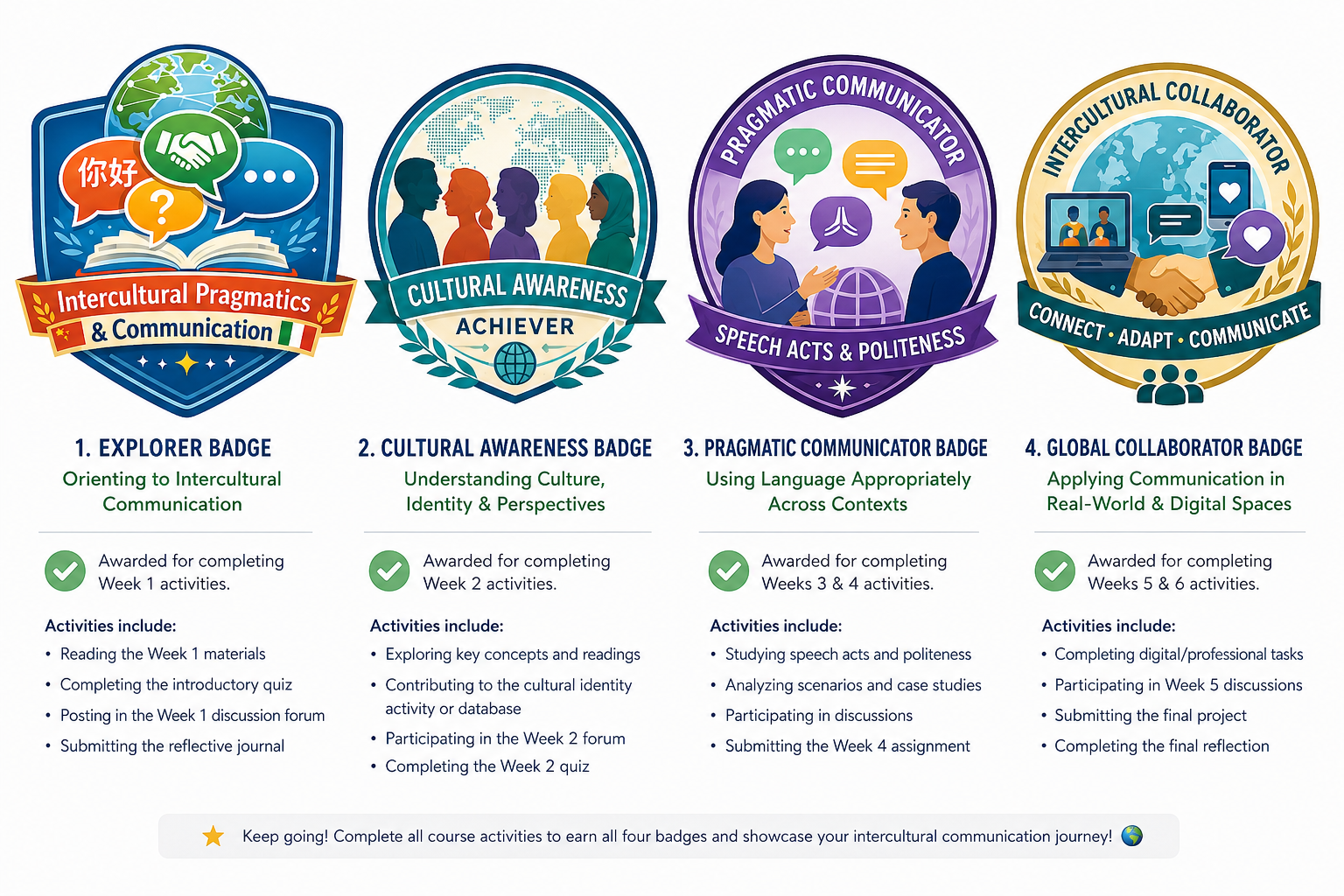
One of the most interesting parts of the process was selecting the visual themes, colors, and symbols for each badge. For example, as can be seen from the initial related Canva screenshot/infographic provided above, I used globes, speech bubbles, books, diverse learners, and collaborative imagery to visually connect the badges to intercultural dialogue and communication. I also experimented with different color palettes to give each badge its own identity while still maintaining a consistent overall style across the collection 🎨🖌️.
During the design process experimentations in Canva now, I gradually realized how important small adjustments can actually be. I spent time refining font choices, resizing elements, balancing spacing, improving contrast, and simplifying some details so that the badges would (hopefully) remain visually clear even when displayed in smaller Moodle badge formats. I also had to optimize the image sizes and formats to ensure they could be uploaded successfully into Moodle without losing their quality 🛠️💻.
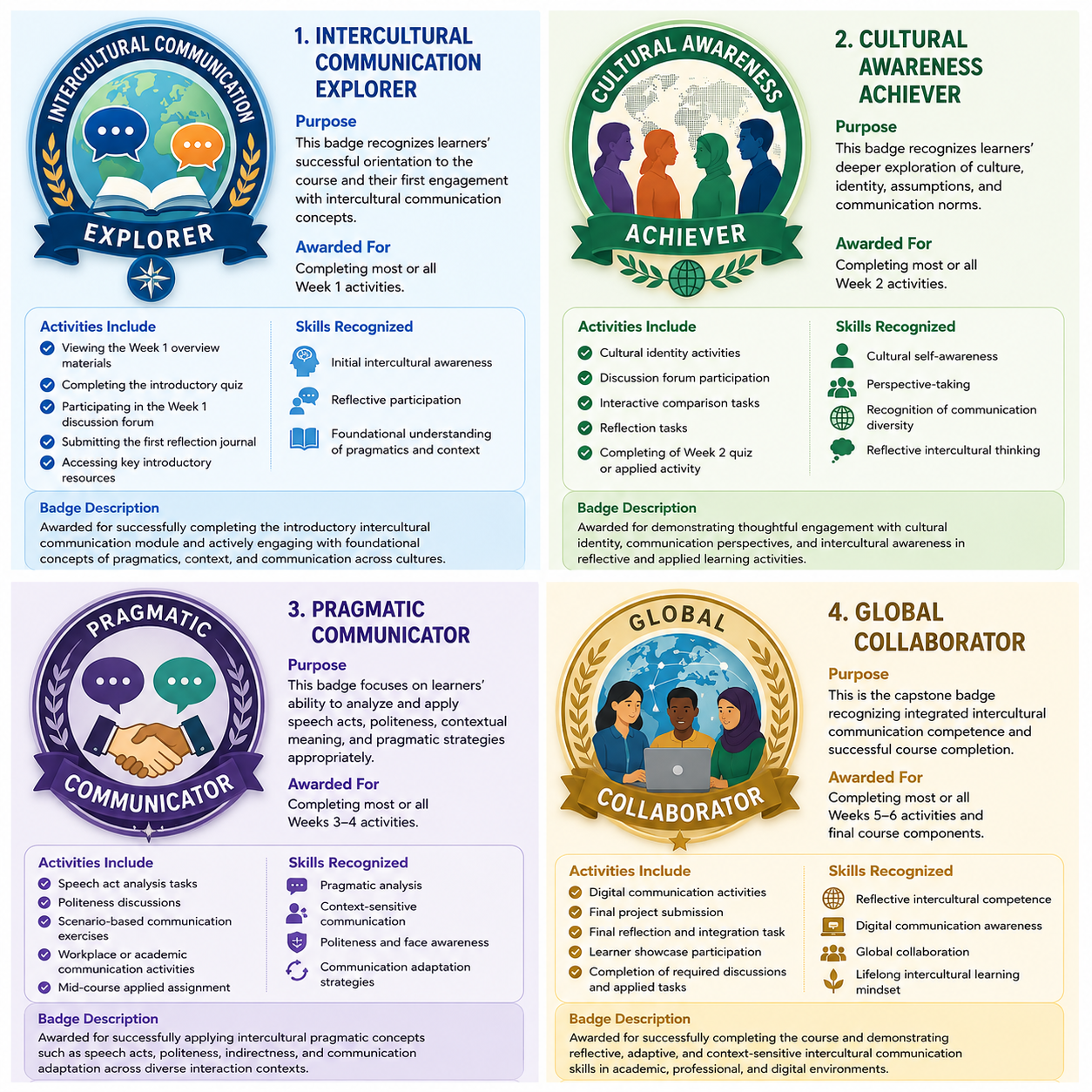
The final version of those mega-super-"newly born" badges as well as the related badge earning criteria, explanations, and some other relevant information/details can be easily identified in this other related screenshot/infographic from Canva 🐼🐻:
What I appreciated most about this highly intriguing activity was how badge design encouraged me to think more deeply about learner motivation and recognition in online courses. Even small digital rewards can help learners feel acknowledged, motivated, and connected to the course community when they are thoughtfully integrated into the learning experience, yep 🌟🙌.
It's good if the video-walkthrough linked above manages to provide some more or less useful ideas and inspiration for anyone interested in using badges in Moodle and/or in other LMS platforms to support engagement and learning... I would also love to hear how others are using digital badges in their own courses and what strategies have worked well for you. Merci! 😊💡
I look forward to continuing experimenting with preparing and incorporating the certificate of completion for the mega-super-hyper-newly born Intercultural Pragmatics & Communication Moodle online course in the next activity or activities here already pretty soon from this highly enchanting moment as well ✨🤗.
"See" you all (mostly) in the next Week 3's activities (first 😉🧐) then as well and cheers! 🥳🤠😎🤩
Fresh Moodle-driven and Moodle-enlightened highly "creatively relaxing + rejuvenating" pre-weekend sunny greetings and kindest wishes 🌷🌹,
Olga.