
Add an Image to your Course (Week 3)

Add an Image to your Course (Week 3)

by janet ayoub -
Number of replies: 3

Hello all,

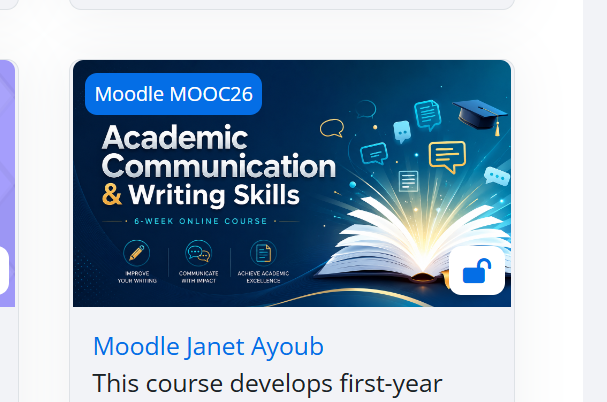
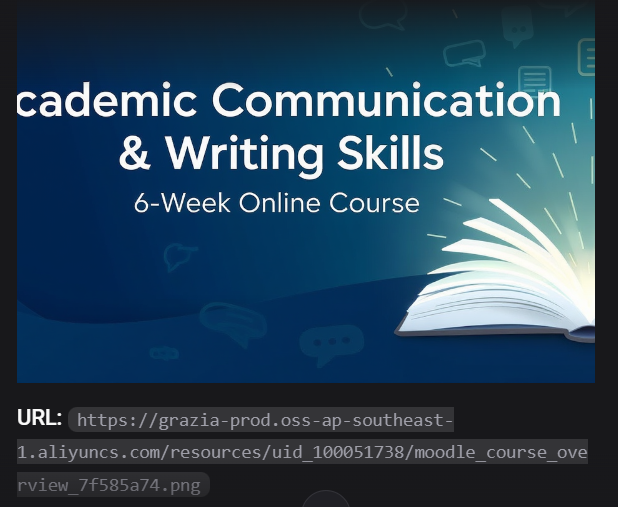
In this activity, I used Enter.Pro to create a course overview image for my Moodle course and then uploaded it to the course settings. I also recorded the entire process using a screen recording tool in order to create a walkthrough video explaining each step. This activity was very useful because it allowed me to explore how AI and digital tools can support course design and online teaching preparation.

At the beginning, I honestly faced some difficulty finding the generated image inside the platform. I thought that perhaps the image had not been created correctly or that I had missed a step during the process. Because of this, I contacted Dr. Neilee for clarification. Dr. Neilee kindly informed me that the image and the link were already available on the platform. Later, I went back again to https://enter.pro/, explored the interface more carefully, and finally found the image successfully. This experience reminded me that technology sometimes requires patience, exploration, and trial and error before becoming comfortable with it.

After finding the image, I downloaded it in the Moodle course overview image format and uploaded it under the course settings. I also copied the course link and verified that the image appeared correctly on the course page. In addition, I prepared my first walkthrough video showing the different stages of the process, including entering the prompt, generating the image, locating and saving it, and finally uploading it to Moodle. Although recording the process felt slightly stressful at first, it became easier as I continued.

What I appreciated most in this activity was the opportunity to experiment with AI tools in a practical way rather than only reading about them theoretically. It showed me how such tools can save time, support creativity, and help teachers create more visually engaging online courses. At the same time, the activity highlighted the importance of adaptability and problem-solving skills when using educational technologies.

In my post, I will include:

  • The screenshot of the generated image and its link in Enter.Pro
  • A screenshot of my Moodle course and its course link
  • The link to my walkthrough video
  • My reflection on the overall process

Overall, this was an interesting and valuable learning experience. Even though I faced a small technical challenge at the beginning, I learned a lot from the process and became more confident in using AI-supported educational tools for online course development.
In reply to janet ayoub

Add an Image to your Course (Week 3)

by Olga Muranova -

Hola-hola and hi-hi, Janet! 😀🥳

Merci bien and vielen dank for sharing such a detailed reflection about your experience with Enter.Pro and Moodle here! I really enjoyed reading about your learning process and how you successfully overcame the initial technical challenge. Your explanation showed great patience, persistence, and willingness to explore new educational technologies 🌟💻.

I could completely relate to your experience of not finding the generated image at first because learning new platforms can sometimes feel confusing in the beginning. I think it was wonderful that you continued exploring the interface carefully and eventually solved the issue successfully. That moment probably made the learning experience even more meaningful and rewarding 😊✨.

I also liked how you highlighted the importance of adaptability and problem-solving skills when using AI tools in education. Your reflection clearly demonstrates how practical activities like this can help educators become more confident and creative in online course design. The walkthrough video idea was also excellent because it allows others to understand the process step by step in a very clear way 🎥📚.

Overall, your post was very informative, reflective, and inspiring to read. The video-walkthrough added much to that as well, I'd say 🙂😊. Kudos and vielen dank for sharing your super-interesting experience and insights with all of us! I look forward to seeing more of your creative work in Moodle course development then too 🌸🙌.

"See" you and the others somewhere around here/not far from here already pretty soon from this highly intriguing moment hopefully for super-mega-sure then as well and cheers! 🤡🤠😎🤩

                 Fresh highly "creatively stimulating + encouraging" very happy Friday greetings and sweetest wishes 🍎🍏,

                                            Olga.  

In reply to janet ayoub

Add an Image to your Course (Week 3)

by Jurix Rivero -

Hi, Janet,

Thank you for sharing your experience.

I think it is great that all of us used Enter.Pro and also recorded the whole process. It is normal to face some difficulties at the beginning, so it is good that you solved the problem by exploring the platform again and asking for help when needed. It was exactly what I have done.

Your reflection shows that you learned a lot from the activity, especially about using AI tools in a practical way.

Kind regards,

Jurix

In reply to janet ayoub

Add an Image to your Course (Week 3)

by Rasha Mansour -

Hi Janet,

This is a thoughtful and well-written reflection. You clearly explained the process step by step and showed honesty about the challenges you faced while learning the tool. I especially liked how you reflected on problem-solving, patience, and adaptability when using new technologies. Your explanation demonstrates strong engagement with the activity and a genuine effort to learn practical AI applications for education.

I also appreciate how you connected the experience to online teaching and course design rather than only describing the technical steps. Including the walkthrough video and screenshots will make your post even more helpful and engaging for others. Overall, this is an excellent reflection that shows growth, persistence, and confidence in using AI-supported educational tools. Great work!